

Carousel Ads: Card Jobs and Destinations
A carousel ad is one paid unit with multiple swipeable cards. Use it for a sequence, a catalog, or distinct benefits. Do not assume the first card stays first or that extra cards raise conversions.
A carousel ad is a paid social unit with multiple scrollable cards. Each card can carry its own visual and, depending on the platform, its own headline, description, and destination. Treat it as one input to paid social, not as a conversion multiplier.
Use a carousel when you have a sequence (problem, proof, offer), a catalog (several in-stock items), or distinct benefits that a single frame cannot hold. If every card repeats the same headline, a single image is the cleaner test.
Use current Meta, LinkedIn, and TikTok Help pages for card limits, destinations, and optimizations. A third-party spec sheet can go stale the day a platform changes those rules.
When the format fits
| Story type | What each card does | Destination pattern | Skip if |
|---|---|---|---|
| Sequential | Hook, proof, objection, action | Same offer URL, or step URLs that still complete the same conversion | The viewer must see card 1 first and the platform can reorder |
| Catalog | One in-stock product per card | Unique product URL per card | The set can fall below two in-stock items |
| Multi-benefit | One claim per card, same product | Same product URL, unique UTM per card | The claims are not visually distinct |
Boosted posts can promote existing creative; Meta also lets you create a carousel from a Facebook Page when you promote a website. Ads Manager remains the path when you need conversion locations, catalog sets, or card-level reporting. CTR discipline still applies: the visible promise must match the landing page. Engagement rate on a card is not a sale.
Storyboard: job, proof, destination, event
Assign the four fields before design. Hypothetical four-card home-services carousel (labeled sample):
| Card | Job | Proof on the card | Destination | Measurement event |
|---|---|---|---|---|
| 1 | Name the offer | ”$89 tune-up this month” on image | Offer landing page | Landing page view |
| 2 | Show the work | Photo of the actual service, not stock | Same page, #whats-included | Scroll or product view |
| 3 | Remove a barrier | ”Same-week Saturday slots” plus hours | Booking form | Form start |
| 4 | Ask for the action | CTA “Book the window” | Form with unique UTM card4 | Qualified booked job |
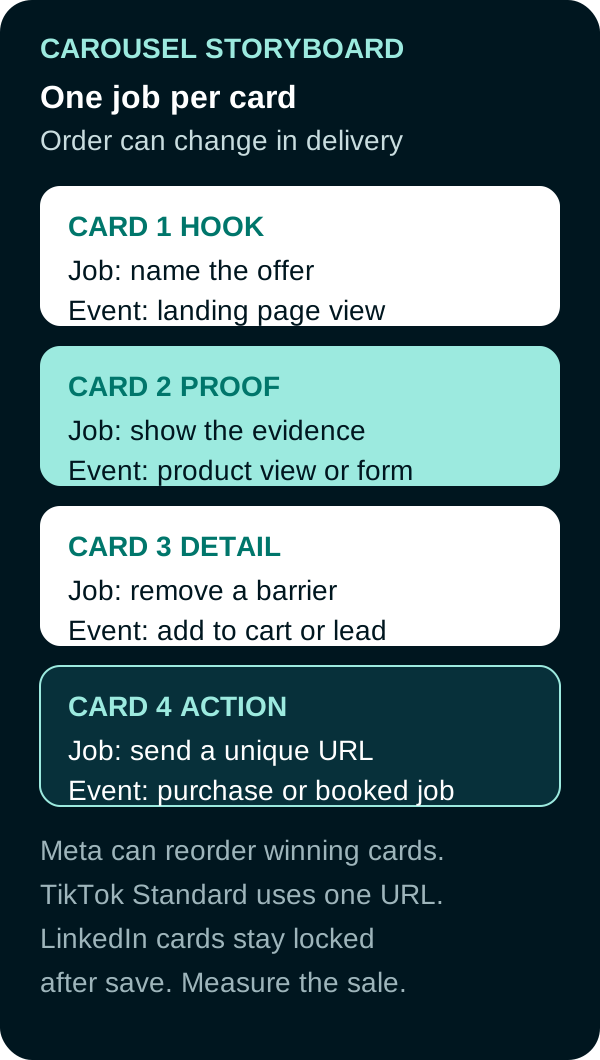
If a card has no unique job, delete it. If the platform can reorder cards, do not write a story that only works in one sequence.
Accessibility: write alt text for each card image, keep type large enough to read on a 390-pixel screen, and do not put legally required terms only on a later card the viewer may never open.
Current platform rules (retrieved September 20, 2026)
Meta (best practices, create in Ads Manager, card metrics):
- Two or more image or video cards, each with its own headline, description, link, and call to action. Help says you can include up to 10 cards.
- Catalog carousels need at least two eligible in-stock items; below that, the ad can become a single-image ad or stop.
- Delivery options may automatically show the best-performing cards first or display cards as a slideshow video. Confirm those options before using a sequence that depends on card 1.
- Use the carousel-card reporting available in Ads Manager, then keep unique URLs or UTMs where the destination permits them so downstream results can be reconciled.
Because delivery can reorder cards, make each card understandable on its own and measure the order people actually received.
LinkedIn (carousel specifications and create carousel image ads):
- 2 to 10 image cards. Videos cannot be added.
- Different destination URLs are allowed. A Lead Gen Form CTA uses the same form for every card.
- After save, cards cannot be edited.
- Intro text: 255 characters max, 150 recommended to avoid truncation. Card headline: 45 characters. Images recommended 1080 x 1080.
TikTok (About Carousel Ads, updated July 2025, and specifications, updated September 2026):
- In-feed image format. Standard Carousel supports Spark and non-Spark. VSA / catalog carousel is non-Spark only.
- Standard Carousel image count: 2 to 35 JPG or PNG images. Catalog/VSA Help lists a 20-image shown maximum. Music is required (looped, at least 2 seconds, MP3).
- Standard Carousel (not catalog-powered): one URL and one caption/CTA for all images.
- Catalog / VSA: each product image can use a unique product link.
- Commercial Music Library tracks are not available on TikTok Ad Network placements; upload compatible music when that placement is part of the buy.
Placement availability can vary by account and objective. Confirm the selectable placements in Ads Manager before producing placement-specific creative.
Measurement without over-claiming
Read card clicks and the downstream event you named in the storyboard. Meta video metrics on a carousel can aggregate activity across the videos in the ad, so unique card URLs or UTMs still matter for the sale. LinkedIn will not let you patch a weak card after save, so a bad card 3 is a new ad. TikTok Standard Carousel uses one URL for the whole unit, which limits destination-based card attribution.
Do not report “carousels convert better” from a mixed test that also changed audience, budget, or landing page.

Frequently Asked Questions
What is a carousel ad?
A carousel ad is a single ad unit with multiple swipeable cards. On Meta, each card can have its own headline, description, link, and call to action. LinkedIn and TikTok support multi-card formats too, with different destination and edit rules.
Does the first card always get the most views?
No. Meta can automatically show the best-performing cards first, and a carousel may render as a slideshow video. Delivery may not follow upload order, so measure card-level activity and make each card understandable on its own.
Can every card have its own URL?
On Meta, yes: each card can have its own link. LinkedIn allows different destination URLs, except that a Lead Gen Form CTA uses the same form for every card. TikTok Standard Carousel (not catalog-powered) uses one URL for all images; catalog carousels can send each product to its own link.
When should you skip a carousel?
Use a single image or video when every card would repeat the same message, when the platform cannot give each card the destination you need, or when you cannot read card-level results. Extra cards are not a conversion tactic by themselves.
Sources
- Meta Business Help, Best practices for carousel ads, accessed September 20, 2026.
- Meta Business Help, Create a carousel ad from Meta Ads Manager, accessed September 20, 2026.
- Meta Business Help, View metrics for carousel ads, accessed September 20, 2026.
- Meta Business Help, About video ad metrics, accessed September 20, 2026 (page required login in this environment; carousel video metrics sum the videos in the ad).
- Meta Business Help, About Meta metrics being removed, accessed September 20, 2026 (page required login in this environment; carousel-card breakdown currently supports link clicks, not conversion or calculated metrics such as CTR).
- Meta Business Help, Design specifications for carousel ads, accessed September 20, 2026 (page required login in this environment; card min/max also stated on the best-practices page).
- LinkedIn Help, Carousel Ads advertising specifications, accessed September 20, 2026.
- LinkedIn Help, Create carousel image ads in Campaign Manager, accessed September 20, 2026.
- TikTok Ads Manager Help, About Carousel Ads, updated July 2025, accessed September 20, 2026.
- TikTok Ads Manager Help, Specifications for Carousel Ads, updated September 2026, accessed September 20, 2026.
PUT THIS KNOWLEDGE TO WORK
NEED MORE HELP?
Talk with our team about applying Carousel Ads to your marketing.
Get a free marketing audit call