

What Do Impressions Mean on Google Ads? Formula, Examples
An impression counts each time an ad appears on Google or the Google Network. It measures delivery; clicks, viewability, and conversions are separate measures.
A Google Ads impression is counted each time an ad appears on a Google search result page or another site in the Google Network. Impressions show delivery. They do not, by themselves, prove that someone noticed the ad, clicked it, or completed a valuable action.
When impressions are unexpectedly low, diagnose eligibility and available demand before raising bids or budget. A campaign can miss delivery because it is paused, under review, restricted by targeting, serving outside its schedule, limited by search volume, constrained by budget, or losing auctions because of Ad Rank.
What does an impression count?
Google’s impressions definition says an impression is counted whenever an ad appears on Google or the Google Network. That makes impressions the base delivery count used in several other calculations:
- Click-through rate (CTR) = clicks ÷ impressions × 100
- Cost per thousand impressions (CPM) = cost ÷ impressions × 1,000
- Impression share = impressions received ÷ estimated eligible impressions
If a campaign produces 5 clicks from 100 impressions, its CTR is 5%. That calculation describes response among recorded impressions. It does not tell you whether the clicks were qualified or whether the campaign produced business results.

Served impressions are not the same as viewable impressions
A served impression is not evidence that every pixel remained visible long enough for a person to notice it. For supported Display and Video inventory, Google reports Active View metrics separately. Google defines a viewable display impression as at least 50% of the ad area visible for at least one second, with a different threshold for large display ads, and a viewable video impression as at least 50% visible while the video plays for at least two seconds.
Search campaigns do not use Active View in the same way. For Search, inspect where the ad appeared using top and absolute top metrics, then judge the search terms, clicks, and conversions that followed.
| Metric | Question it answers | What it does not prove |
|---|---|---|
| Impressions | How often was the ad served? | Attention or business impact |
| Viewable impressions | How often did supported inventory meet a viewability threshold? | That a person looked at or remembered the ad |
| Clicks and CTR | How often did delivery produce a click? | Lead quality or revenue |
| Conversions | How many attributed actions were recorded? | Incremental lift by itself |
How to diagnose zero or low Google Ads impressions
Work through the causes in order. Changing bids first can add cost without fixing the actual constraint.
- Confirm status and dates. Check that the campaign, ad group, ads, and keywords are enabled and eligible. Confirm start and end dates, ad schedule, billing, and policy status.
- Use Ad Preview and Diagnosis. For Search campaigns, Google’s Ad Preview and Diagnosis tool can test a query without adding an impression. It also surfaces several reasons an ad may not appear.
- Check targeting and demand. Review location, language, device, audience, schedule, keyword match, negatives, and actual search volume. A narrow but correct audience may simply have limited eligible demand.
- Add competitive metrics. In Google Ads, open Campaigns, choose Columns, then add impression share and lost impression share from Competitive metrics. Google documents the current steps in Get impression share data.
- Separate budget from rank. Search lost impression share due to budget estimates missed eligibility caused by insufficient budget. Search lost impression share due to rank estimates missed eligibility caused by Ad Rank.
- Inspect change history and trends. A sudden decline after an edit needs a different response than a new campaign with little search demand.
- Make the smallest relevant change. Fix status or policy issues, correct targeting, improve ads and landing-page relevance, or change bids and budget only when the evidence points there.
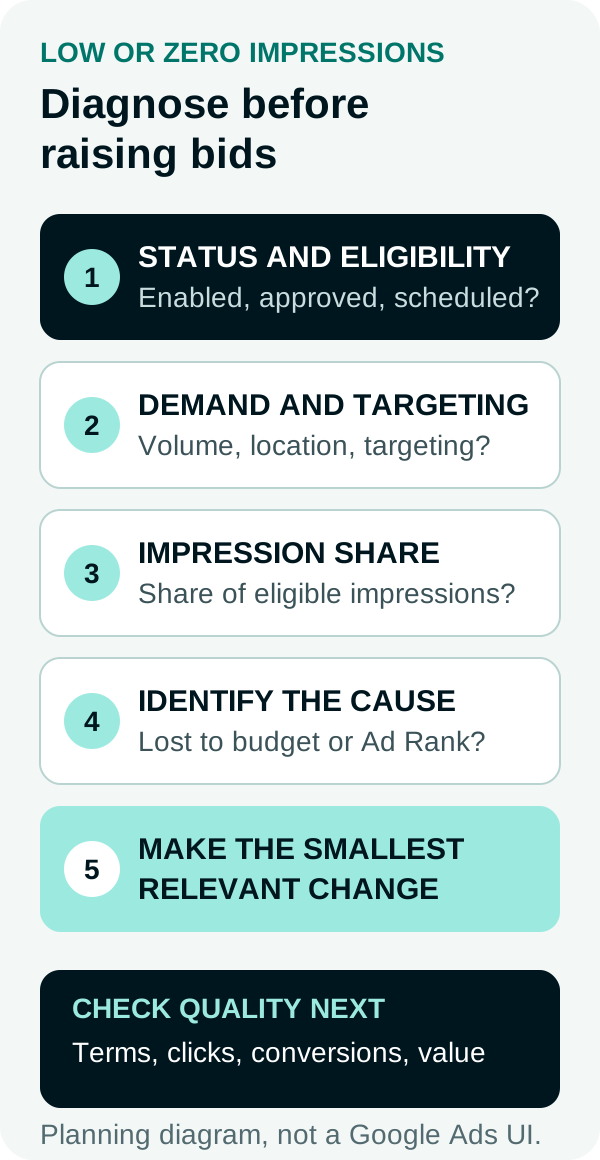
Diagnostic planning diagram. It is not a screenshot of the Google Ads interface.
How to read impression share
Impression volume alone has no fixed “good” level because eligible demand differs by market, query set, targeting, schedule, and auction. Impression share adds the missing denominator.
Suppose a campaign recorded 4,000 impressions and Google estimated 5,000 eligible impressions:
4,000 ÷ 5,000 × 100 = 80% impression share
The remaining opportunity still needs diagnosis. If lost impression share due to budget is high, more budget or tighter allocation may increase eligible delivery. If lost impression share due to rank is high, review Ad Rank, ad relevance, landing-page experience, expected response, bid strategy, and auction competition.
Do not add the two lost-impression-share metrics to estimate guaranteed future volume. They are auction estimates, and conditions change.
What action should each pattern trigger?
| Observed pattern | Likely next check | Avoid assuming |
|---|---|---|
| Zero impressions and not eligible | Status, policy, billing, dates | A higher bid will fix eligibility |
| Eligible but little demand | Search terms, match types, location, schedule | The budget is too small |
| High lost IS due to budget | Daily budget, allocation, campaign priority | More impressions will be profitable |
| High lost IS due to rank | Ad Rank inputs and auction competitiveness | Bid is the only rank input |
| More impressions, weaker CTR or conversion quality | Query and placement quality | More reach is automatically better |
| Display impressions but weak visibility | Active View measurable and viewable metrics | Served means noticed |
Read impressions beside click-through rate, search terms, conversion quality, and business outcomes. Anderson Collaborative’s paid search capabilities cover campaign structure, query control, creative testing, and measurement when the diagnosis needs active account work.
FAQs
What is an impression in Google Ads?
Google Ads counts an impression each time an ad appears on Google or the Google Network. An impression records delivery, but it does not prove that a person noticed the ad or that the impression was viewable.
Why is my Google Ads campaign getting zero impressions?
Check campaign, ad group, ad, and keyword status; dates and schedule; policy review; billing; targeting; eligible search demand; and Ad Rank. Use Ad Preview and Diagnosis for Search campaigns before changing bids or budget.
How do impression share and lost impression share help?
Impression share compares impressions received with estimated eligible impressions. Search lost impression share due to budget indicates budget constraint, while lost impression share due to rank indicates Ad Rank constraint.
Are impressions the same as views or viewable impressions?
No. A served impression records that the ad appeared. Google reports viewability separately through Active View for supported Display and Video inventory, and a video view follows its own counting rules.
Sources
- Google Ads Help, Impressions: Definition, accessed September 19, 2026.
- Google Ads Help, Get impression share data, accessed September 19, 2026.
- Google Ads Help, Find your first ads with Ad Preview and Diagnosis, accessed September 19, 2026.
- Google Ads Help, Understanding viewability and Active View reporting metrics, accessed September 19, 2026.
PUT THIS KNOWLEDGE TO WORK
NEED MORE HELP?
Talk with our team about applying Ad Impressions to your marketing.
Get a free marketing audit call