

Google Ads Quality Score: Diagnose the Three Components
Quality Score is a keyword-level diagnostic, scored 1 to 10, that compares expected clickthrough rate, ad relevance, and landing page experience with other advertisers. It is not an input in the ad auction.

Quality Score is a keyword-level diagnostic in Google Ads Search campaigns. Google scores it from 1 to 10 and breaks it into expected clickthrough rate, ad relevance, and landing page experience. Google Ads Help is explicit: Quality Score is not a key performance indicator, should not be optimized or aggregated, and is not an input in the ad auction.
Auction-time Ad Rank still uses a live quality assessment, along with bid, thresholds, competition, search context, and expected asset impact. That is why a better page can change cost and eligibility even when the displayed 1-to-10 figure has not moved yet. Improving the underlying experience is the job. Raising the badge is not. Paid search reporting should keep CPC and conversion quality next to these diagnostics, not underneath them.
What the three statuses actually compare
Each component is labeled Above average, Average, or Below average. The comparison is other advertisers whose ads showed for the exact same search over the last 90 days.
| Component | Google’s definition | Typical evidence | What it is not |
|---|---|---|---|
| Expected CTR | Likelihood the ad will be clicked when shown | Search terms, actual CTR on similar keywords, offer clarity | A reason to buy a higher slot so the score rises. Expected CTR is normalized for position and assets |
| Ad relevance | How closely the ad matches the intent behind the search | Keyword themes versus headlines and descriptions | A landing-page problem. Relevance is the ad-to-query match |
| Landing page experience | How relevant and useful the page is after the click | Offer continuity, navigation, mobile use, load speed | A conversion-rate grade. Google says conversion rate does not change the landing-page status |
Match type changes do not recalculate Quality Score, because the score is based on exact searches of the keyword. A broad-match keyword can still inherit a score when an exact-match keyword in the same ad group has impressions for those exact searches.
A dash means there are not enough exact searches to score the keyword. Use Keyword Planner or inspect a related exact term. Do not treat a dash as a 1, and do not compare it with scored keywords.
Google also notes that device, location, time of day, assets, and crawler information can affect ad quality in ways the 1-to-10 view does not fully capture. Historical Quality Score columns exist if you need the daily series. They are still diagnostics.
Diagnostic map
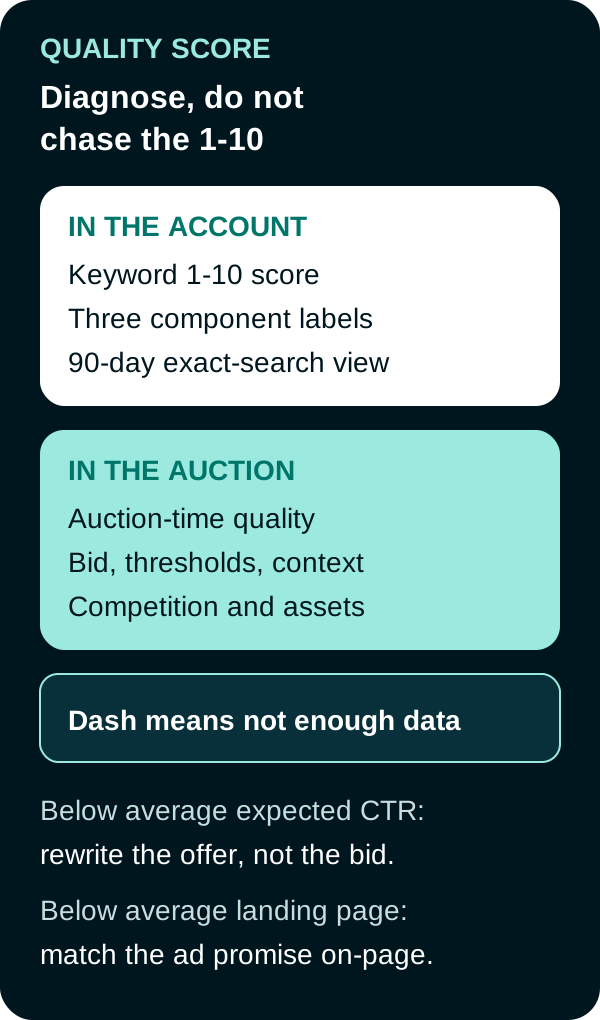
Fix the weak component. The auction does not read the 1-to-10 badge.
| If this is below average | Inspect | Next useful change |
|---|---|---|
| Expected CTR | Search terms report versus the ad’s promise; CTR on tighter-intent keywords; whether the call to action is specific | Rewrite the offer, proof, or call to action to match the query. Do not raise bids to “fix” expected CTR |
| Ad relevance | Ad groups that mix unrelated intents; headlines that never mention the keyword theme | Split mixed keywords into themed ad groups with matching RSA copy. Moving the same ads and keywords to another campaign does not change quality |
| Landing page experience | Whether the page delivers the advertised item, works on mobile, and is easy to complete | Point the click at the page that fulfills the ad. Improve speed and navigation. Conversion rate is a parallel check, not a Quality Score lever |
Google’s ads quality notes add two more non-levers: account structure names do not create a campaign-level Quality Score, and running on Display or search partners does not change Google.com quality.
Worked diagnosis (hypothetical)
A keyword emergency plumber austin shows Quality Score 5, expected CTR below average, ad relevance average, landing page above average.
- Search terms include “emergency plumber” and “plumber near me.”
- The RSA leads with “Family-owned since 1994.”
- The landing page is the Austin emergency dispatch form and loads quickly.
The weak component is expected CTR, not the page. A useful next ad test leads with emergency availability and response window, then the brand line. Bid changes are a later Ad Rank decision. If the form completion rate is already strong, do not rebuild the page to chase the 1-to-10 score.

Frequently Asked Questions
What is Google Ads Quality Score?
Quality Score is a keyword-level diagnostic from 1 to 10. It combines expected clickthrough rate, ad relevance, and landing page experience, each labeled above average, average, or below average versus other advertisers on the same exact search over the last 90 days.
Does raising Quality Score lower CPC?
No. Google states that the 1-to-10 Quality Score is not an input in the ad auction and should not be treated as a KPI. Auction-time quality can affect Ad Rank and cost. Chasing the displayed score is not the same as changing an auction.
What does a dash in Quality Score mean?
A dash means there are not enough exact searches of that keyword in the lookback window to score it. It is missing data, not a one. Gather traffic or inspect a related exact keyword before you compare it with scored terms.
How should a team use the three components?
Read expected CTR, ad relevance, and landing page experience separately. Fix the weak component with evidence from search terms, ad copy, or the page. Do not average scores across the account.
Sources
- Google Ads Help, About Quality Score for Search campaigns, accessed September 20, 2026.
- Google Ads Help, 5 ways to use Quality Score, accessed September 20, 2026.
- Google Ads Help, What matters (and what doesn’t) when it comes to ads quality, accessed September 20, 2026.
- Google Ads Help, About Ad Rank, accessed September 20, 2026.
- Google Ads Help, Optimize your ads and landing pages, accessed September 20, 2026.
PUT THIS KNOWLEDGE TO WORK
NEED MORE HELP?
Talk with our team about applying Google Ads Quality Score to your marketing.
Get a free marketing audit call