

Conversion Tracking: Setup, Testing, and Common Errors
Conversion tracking records a defined business action and associates it with marketing. Start with the event specification. Tags, pixels, and APIs only collect what you named.
Conversion tracking records a defined business action and associates it with campaigns and channels under each platform’s rules. It connects spend to observed events through tags, pixels, and event tracking. Use it with conversion rate analysis and marketing attribution inside conversion rate optimization work. Assigned conversions are not incrementality.
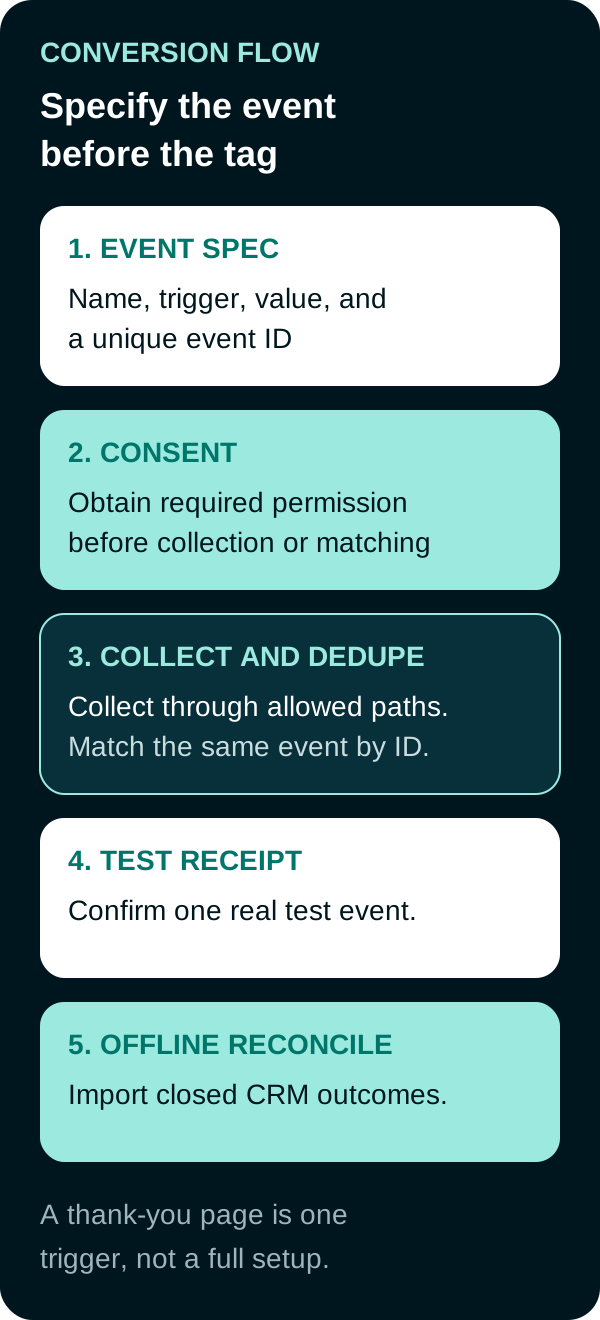
Start with a platform-neutral event specification
Write the event before you paste a tag.
| Field | What to decide |
|---|---|
| Name | One stable name, such as purchase or qualified_lead |
| Trigger | The real success moment, not a convenient page |
| Value and currency | Transaction value, or a documented lead value |
| Unique ID | Order ID or a generated event ID shared across browser and server |
| Count | One per click for leads, every conversion for purchases, matching Google’s counting options |
| Owner | Who can change the trigger without breaking bidding |
A thank-you page is sufficient only when that URL loads once per successful action. It is not universal. Single-page checkouts, in-page success states, phone calls, chat, app installs, and offline sales may need another event trigger. A dedicated confirmation URL can work when it loads reliably once per success and reloads are deduplicated.
Google Ads and GA4, current path
Google now calls this the Google tag. It is the renamed successor to the global site tag, so an existing gtag.js implementation may remain valid. GA4 key events replace the old Universal Analytics goals terminology.
Current Google Ads Help (Use the Google tag, Set up your web conversions):
- Create a website conversion action.
- Put the Google tag on every page, or configure it inside Google Tag Manager and link the Ads account.
- Measure the event with a URL rule, an event snippet, or a GTM conversion tag. URL-based setup can detect a confirmation URL without extra page code when that URL is real and unique.
- Confirm status with Tag Assistant and the conversion Diagnostics view. Status can take up to 48 hours to update.
- Turn on enhanced conversions if you can send hashed first-party email, phone, or address under Google’s customer data terms. Enhanced conversions supplement the tag. They do not replace a missing event.
ad_user_dataconsent is required for this matching. See About enhanced conversions for web and consent mode.
In GA4, mark the business event as a key event, then import it to Google Ads if the Ads conversion should reuse that event. GA4 key events are not the old Universal Analytics goals.
Pass a unique transaction ID on purchases so Google can drop duplicate firings of the same order.
The 2023 Google Ads tutorial below shows an older UI. Pair it with the current Help articles above. The product steps in this page follow 2026 Help, not the video.
Meta Pixel and Conversions API
Install the Meta Pixel for browser events. Add the Conversions API for server events. Meta recommends a redundant setup: send the same events both ways, then deduplicate with matching event / event_name and eventID / event_id. Duplicates received within 48 hours are discarded. If the IDs do not match, you count twice.
CAPI limits: it captures events the browser missed, but match quality still depends on the customer identifiers you are allowed to send. It does not restore every blocked browser signal, and it is not a consent bypass.
Use Events Manager test events as the receipt, the same way you use Tag Assistant on Google.
Test receipts, attribution limits, and offline reconciliation
A setup is not done when the snippet is on the page. Send one real test conversion and keep the receipt:
- Google Ads conversion status and Diagnostics
- GA4 DebugView or real-time for the key event
- Meta Test Events, with event ID visible on both paths
Consent mode changes what tags send when storage or user-data consent is denied. Modeled conversions can appear in Google Ads. They are estimates, not extra observed fires.
Platform conversion columns still follow that platform’s attribution window and model. They will not match a CRM one-to-one. Import offline closed-won outcomes (Google Ads Data Manager / offline conversions, Meta offline events) using the click IDs you stored, then reconcile counts and value with finance. Keep different lifecycle events, such as a lead and a later closed sale, as separately named actions. Deduplicate only duplicate records of the same real event. Use primary and secondary campaign goals deliberately so bidding does not optimize twice for one outcome.
Conversion tracking starts with a business event and ends with a verified platform receipt. A firing browser tag can still send duplicates, omit values, or map to the wrong optimization action.
Frequently Asked Questions
What is conversion tracking?
Conversion tracking records when a user completes a defined action, such as a purchase, qualified lead, or call, and associates that event with a marketing interaction under platform rules. It reports observed events, not incrementality.
Is a thank-you page enough to track conversions?
Sometimes. A confirmation URL can work when it loads uniquely after each success and reloads cannot create duplicates. Single-page apps, in-page success states, calls, chats, app events, and offline sales need other triggers. Specify the real success moment first.
How do you set up Google Ads and GA4 conversion tracking now?
Create a conversion action in Google Ads and use the Google tag sitewide, then an event snippet or a URL-based event. The Google tag is the current name for the technology previously called the global site tag, so existing gtag.js implementations may remain valid. In GA4, mark the event as a key event and import it if needed.
How do Meta Pixel and Conversions API stay in sync?
Send the same event name and the same event ID on the browser Pixel and the server Conversions API. Meta discards later duplicates received within 48 hours. Without matching IDs, a redundant setup double-counts.
Video tutorial
Video: Setting up Conversion Tracking Pt 1: Google Ads Tutorials by Google Ads, published September 15, 2023. The 2023 UI may have changed. Use current Google Ads Help for setup. This video is a product tutorial, not proof of campaign outcomes.
Sources
- Google Ads Help, Use the Google tag for Google Ads conversion tracking, accessed September 19, 2026.
- Google Ads Help, Set up your web conversions, accessed September 19, 2026.
- Google Ads Help, About conversion counting options, accessed September 19, 2026.
- Google Ads Help, About enhanced conversions for web, accessed September 19, 2026.
- Google Ads Help, About consent mode, accessed September 19, 2026.
- Meta, Handling Duplicate Pixel and Conversions API Events, accessed September 19, 2026.
PUT THIS KNOWLEDGE TO WORK
NEED MORE HELP?
Talk with our team about applying Conversion Tracking to your marketing.
Get a free marketing audit call