

Event Tracking: Contracts, GA4 Events, and Ads Conversions
Event tracking records named actions on a site or app. Collecting an event, marking a GA4 key event, and creating a Google Ads conversion are three different jobs. Specify the event before you add tags.

Event tracking records a named action on a website or app, with enough context to use that action in a report or a bid. Clicks, downloads, form successes, purchases, and media plays are useful only when each one has a trigger, an owner, and a decision it can change. Extra telemetry without that contract hides missing outcomes.
This page is the event specification. Conversion tracking is the ads-side setup and test receipt. Read rates next to conversion rate. When the numbers expose an execution gap, reporting and analysis is the related service.
The event contract
Fill this before anyone pastes a tag. The example below is a completed request-a-quote form recorded as generate_lead.
| Field | What to decide | Example |
|---|---|---|
| Name | One stable name. Prefer a GA4 recommended event such as purchase or generate_lead when it fits | generate_lead |
| Trigger | The real success moment, not a convenient pageview | Form returns HTTP 200 and shows the in-page confirmation |
| Parameters | Properties the report or bid needs | lead_type, form_id |
| Value and currency | Transaction value, or a documented lead value | value: 50, currency: USD |
| Identity and consent | What the implementation may store or send under the site’s consent setup | Consent state checked before optional advertising features run |
| Duplicate prevention | How the trigger avoids firing twice for one successful submission | One success callback per form submission; disable repeat firing on rerender |
| Environment | Web, app, or both, plus staging vs production measurement IDs | Production web stream only |
| Owner | Who can change the trigger | CRM admin plus analytics lead |
| Destination | Where the event must arrive | GA4 property, then Ads if you will bid |
| Debug receipt | The screen that proves one real test fired once | GA4 DebugView plus Ads Diagnostics if imported |
| Version | Date and what changed | 2026-09-20, confirmation trigger, not thank-you pageview |
| Supported decision | The choice this event is allowed to change | Investigate the form or campaign if completed submissions fall after a tracking check |
An event earns a place in the plan only when someone can state that decision. Collecting every click is not a measurement strategy.
Four GA4 event types
Google Analytics groups events into four types (developers documentation last updated June 9, 2026):
| Type | Setup needed? | Use |
|---|---|---|
| Automatically collected | No, once the Google tag is on the site or app | first_visit, session_start, user_engagement |
| Enhanced measurement | Usually no, when enabled in the GA4 UI | Common web interactions such as scroll, click, file_download |
| Recommended | Yes | Standard names such as purchase, login, sign_up that feed built-in reports |
| Custom | Yes | Organization-specific actions with no recommended name |
Automatic events have limited business context. Recommended events need implementation, and they keep names comparable across sites. Custom events are easy to name poorly. Do not ship click_button_1 when generate_lead already exists.
With gtag.js, place recommended or custom event commands after the Google tag snippet so the tag loads before the event command runs. Google Tag Manager uses container load order, triggers, and tag sequencing instead of page placement below a gtag snippet. Confirm either implementation in Realtime or DebugView.
Collection, key event, Ads conversion
These are not one toggle.
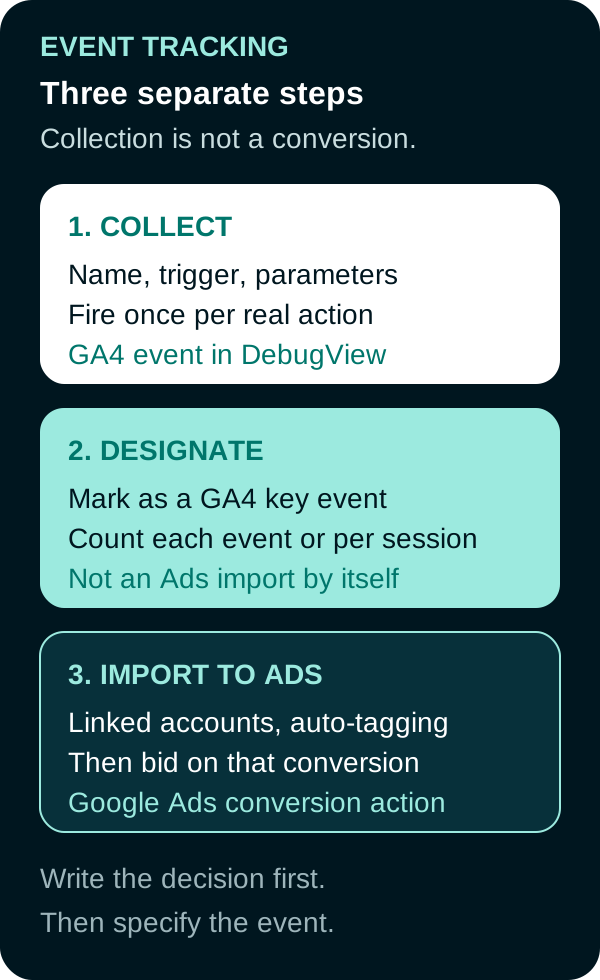
Collecting an event, marking it as a key event, and importing it as a Google Ads conversion are separate steps. The Ads conversion can feed bidding when it is a Primary action included in the campaign's selected conversion goals.
- Collect the event. The tag, GTM trigger, or app SDK fires with the contract’s name and parameters.
- Mark an eligible key event in GA4 when the action is important to the business. You can mark an event already listed in the property or create a key event from an event name you expect to collect. Marking affects reports from that point forward. It does not rewrite history. Some events, such as
purchase, may already be key events by default. Then choose its counting method: once per event counts every occurrence and is Google’s recommended setting; once per session counts at most one key event per session and can suit actions where repeated completions in one visit should not add value. Counting changes apply prospectively. - Create a Google Ads conversion if campaigns should report or bid on it. Google’s current path: mark the event as a key event, link Analytics and Ads, enable auto-tagging, then import through Ads (Goals → Import → Google Analytics properties → Web) or through Analytics (Advertising → Conversion management). Events you pick from the Events list during that flow are marked as key events. For bidding with standard conversion goals, set the imported conversion as a Primary action and include its goal in the campaign’s selected goals. Newly linked properties or new key events can take 24 to 48 hours to appear.
Google Ads conversions do not appear in standard GA4 reports. You evaluate them in Google Ads or in the Analytics Advertising section. Native Google Ads conversion tags remain a separate implementation from a GA4 import. If both record the same success, choose one primary action for bidding and document how the second action is used so the campaign does not optimize toward duplicate records. See conversion tracking for Google tag, enhanced conversions, and Meta Pixel plus Conversions API.
For ecommerce, GA4 uses transaction_id on purchase events to help avoid duplicate transactions in web streams. That rule is purchase-specific; it is not a generic deduplication method for lead events. Prevent duplicate lead events in the implementation, then verify one real submission produces one event in DebugView.
| Layer | What it is | What it is not |
|---|---|---|
| GA4 event | Data collection | A bid signal |
| GA4 key event | Reporting designation in Analytics | An automatic Ads import |
| Google Ads conversion | Ads reporting and bidding object | A row in standard GA4 reports |
Debug receipt and ownership
A setup is unfinished until one real success produces one event:
- GA4 DebugView or Realtime shows the name and parameters
- The key-event toggle matches the contract
- If imported, Google Ads conversion status and Diagnostics show the test
- Staging tags are not firing in the production property
Consent mode changes what tags send when storage or user-data consent is denied. Modeled conversions in Ads are estimates, not extra observed fires. Keep one owner, one version note, and one destination list so a form redesign cannot silently break bidding.
Event tracking starts with the decision and the contract. Tags only collect what you named.

Frequently Asked Questions
What is event tracking?
Event tracking is the practice of recording a named action, such as a purchase, form success, or file download, with the parameters needed to use that action in reports or bidding. An event is not a Google Ads conversion until you create or import that conversion.
What is the difference between a GA4 event, a key event, and a Google Ads conversion?
A GA4 event is collected data. A key event is a reporting designation you attach to an event that matters to the business. A Google Ads conversion is an action you create in Ads or import from a key event so campaigns can report and bid on it. Marking a key event does not import it to Ads by itself.
What types of events does GA4 collect?
Google groups four types: automatically collected, enhanced measurement, recommended, and custom. Use a recommended name such as purchase when it fits. Use a custom name only when no recommended event covers the action. Do not create custom events that duplicate automatic ones.
What should you document before implementing an event?
Write the decision the event must support, then fill the event contract, implement the trigger, choose the key-event counting method when applicable, and keep a debug receipt. Stable names, one owner, and one destination make the data easier to maintain.
Sources
- Google for Developers, Set up events, last updated June 9, 2026, accessed September 20, 2026.
- Google for Developers, Recommended events, accessed September 20, 2026.
- Google Analytics Help, About key events, accessed September 20, 2026.
- Google Analytics Help, Set the counting method for key events, accessed September 20, 2026.
- Google Analytics Help, Minimize duplicate key events with transaction IDs, accessed September 20, 2026.
- Google Analytics Help, DebugView, accessed September 20, 2026.
- Google Ads Help, Measure web key events from Google Analytics properties, accessed September 20, 2026.
- Google Ads Help, Create conversions from Google Analytics events in Google Ads, accessed September 20, 2026.
- Google Ads Help, Create Google Ads conversions based on Google Analytics key events, accessed September 20, 2026.
- Google Ads Help, Set up your web conversions, accessed September 20, 2026.
PUT THIS KNOWLEDGE TO WORK
NEED MORE HELP?
Talk with our team about applying Event Tracking to your marketing.
Get a free marketing audit call