

Lead Scoring: Fit, Behavior, and Handoff Thresholds
Lead scoring ranks prospects with separate fit and behavior points so marketing and sales can agree which contacts are ready for a sales handoff.
Lead scoring is a shared ranking of prospects by customer fit and recent behavior, used to decide who is ready for sales and who should stay in nurture. A useful score gives marketing and sales a consistent, reviewable handoff rule.
Pair scoring with audience segmentation, event tracking, and conversion rate reporting. Reporting and analysis is where those scores get compared with accepted leads, opportunities, and closed revenue.
Fit scoring versus behavior scoring
Keep the two scales separate so a poor-fit contact cannot look sales-ready just because they clicked a lot.
| Scale | What it measures | Typical inputs | Failure mode if used alone |
|---|---|---|---|
| Fit | How well the person or account matches the customers you can serve | Title, company size, industry, geography, serviceability | Routes busy people who will never buy |
| Behavior | How recently they showed purchase research | Pricing visits, demo requests, product use, email clicks | Inflates students, competitors, and one-off browsers |
| Combined total | Fit plus behavior after decay and penalties | Both scales on one record | Hides which half of the score is doing the work |
Explicit scoring uses fields the contact or CRM already stores. Implicit scoring uses tracked actions. A predictive model, such as HubSpot’s Likelihood to close property or Salesforce Einstein Lead Scoring, estimates conversion likelihood from historical records. Treat predictive output as a rank, not as an auditable point list, unless the vendor documents the inputs you can inspect.
Auditable sample model
Here is a worked 30-day B2B services example. The point values illustrate the math; each business should calibrate its own weights against sales outcomes.
Fit (maximum 50)
| Signal | Points | Why it is on the card |
|---|---|---|
| Job title matches the buyer persona | +20 | Decision role |
| Company size in the served range | +15 | Account fit |
| Industry in the ICP list | +15 | Offer match |
| Student, competitor, or personal-email role | -20 | Poor fit |
Behavior (maximum 50, last 30 days)
| Signal | Points | Why it is on the card |
|---|---|---|
| Requested a demo | +30 | Direct sales ask |
| Visited the pricing page | +15 | Purchase research |
| Downloaded gated product content | +8 | Early research |
| Clicked a sales email | +5 | Recent attention |
| No qualifying activity for 30 days | -10 | Decay |
Score each positive behavior once during the 30-day window and cap the positive behavior subtotal at 50. Keep contactability separate: an unsubscribe suppresses email regardless of the lead’s score.
Worked contact:
- Fit: title +20, size +15, industry +15 = 50
- Behavior: pricing +15, email click +5 = 20
- Total = 50 + 20 = 70
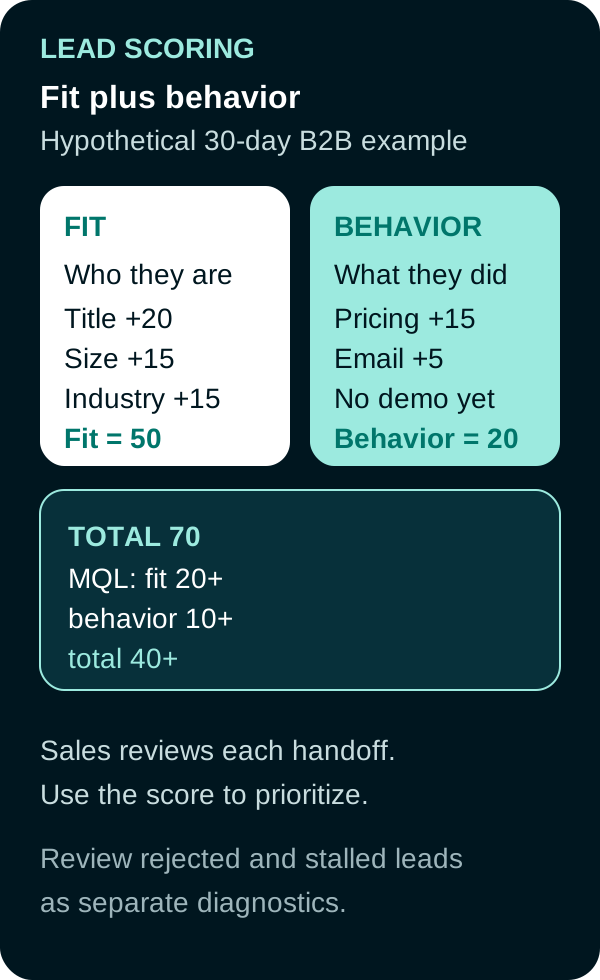
Example: 50 fit points plus 20 behavior points equal a total of 70. The MQL rule also requires minimum fit and behavior scores.
Thresholds you can audit
Write the handoff as a rule, then measure what happens at each stage.
| Stage | Rule in this example | What to count |
|---|---|---|
| Nurture | Fit below 20, behavior below 10, or total below 40 | Contacts still owned by marketing |
| Marketing qualified lead (MQL) | Fit 20 or more, behavior 10 or more, and total 40 or more | MQLs created in the window |
| Sales accepted lead | Sales accepts the MQL within 5 business days | Accept rate = accepted / MQL |
| Opportunity | CRM opportunity created from an accepted lead | Opportunity rate = opportunities / accepted |
| Close | Won opportunity | Close rate = wins / opportunities |
| Sales rejected | Sales reviews the MQL and rejects its fit or intent | Rejection rate = rejected / reviewed MQLs |
| Stalled | MQL receives no disposition inside the service-level window | Stalled rate = undispositioned / MQLs |
A falling accept rate is a diagnostic, not a verdict. Check the threshold, source mix, duplicate records, routing delay, and sales capacity before changing weights. If accepted leads rarely become opportunities, review both the score and the sales-ready definition.
Decay belongs on the behavior scale. Old clicks should not keep a contact above the MQL line after the research window has closed. Sales should be able to see, on the record, which points produced the current total.
Lead-scoring tools
These products can store or calculate scores. The team still defines the handoff rule and the outcome used to recalibrate it.
| Product | What it is for | Official starting point |
|---|---|---|
| HubSpot lead scoring | Custom fit, engagement, or combined scores, with optional High/Medium/Low or A1 to C3 thresholds | Understand the lead scoring tool and build lead scores |
| HubSpot Likelihood to close | Separate predictive probability that a contact becomes a customer within 90 days | Predictive lead scoring properties |
| Salesforce Einstein Lead Scoring | Predictive rank after you choose a conversion milestone and fields | Enable Einstein Lead Scoring |
| Salesforce Account Engagement (formerly Pardot) | Numeric score for activity and letter grade for explicit fit | Lead scoring in Account Engagement and lead grading; product home: Marketing automation |
| Adobe Marketo Engage | Separate demographic and behavior score fields, updated with Change Score flow steps | Build person scoring models and Change Score |
Confirm live edition limits in the account. A score property is only useful if sales can see it and can reject the handoff.
How to launch and recalibrate
- Write the sales-ready definition with sales in the room.
- Score fit and behavior on separate fields, even if you also store a total.
- Start with a short list of high-signal rules. Extra rules make the score harder to audit.
- Set the MQL threshold with minimum fit, minimum behavior, and total-score conditions.
- Decay behavior on a stated clock. Handle unsubscribes and other contact restrictions as suppression rules, independent of the score.
- Review the model frequently during launch, then move to a stable cadence. Compare scores with acceptance, rejection, stalled handoffs, opportunities, and closes before changing weights.
Lead scoring should predict a handoff decision that sales can validate. Separate fit from behavior, record why points were assigned, and review closed outcomes so the model does not reward activity that never becomes qualified demand.
Video explainer
Video: How to Score and Prioritize Leads Like a Pro with HubSpot by HubSpot Academy, published September 5, 2025.
Frequently Asked Questions
What is lead scoring in marketing?
Lead scoring assigns points for customer fit and for observed behavior, then uses agreed thresholds to decide who is ready for sales follow-up and who stays in nurture.
How do you create a lead scoring model?
Write the handoff rule first. Score fit and behavior on separate scales, set an MQL threshold, log why points were given, decay stale activity, and review accepted leads, opportunities, closes, and false positives with sales.
What is an example of lead scoring?
In a simple B2B model, a matching title, company size, and industry can total 50 fit points, while a recent pricing visit and email click add 20 behavior points. If MQL requires at least 20 fit points, 10 behavior points, and 40 total points, that contact is eligible for sales review.
Why is lead scoring important?
It gives marketing and sales a consistent way to prioritize follow-up, explain why a lead was routed, and improve the rule using accepted leads, opportunities, closed business, and sales feedback.
Sources
- HubSpot Knowledge Base, Understand the lead scoring tool, accessed September 20, 2026.
- HubSpot Knowledge Base, Build lead scores to qualify contacts, companies, and deals, accessed September 20, 2026.
- HubSpot Knowledge Base, Determine likelihood to close with predictive lead scoring, accessed September 20, 2026.
- Salesforce Help, Enable Einstein Lead Scoring, accessed September 20, 2026.
- Salesforce Trailhead, Lead scoring in Account Engagement, accessed September 20, 2026.
- Salesforce Trailhead, Lead grading in Account Engagement, accessed September 20, 2026.
- Adobe Experience League, Build person scoring models for Marketo Engage, accessed September 20, 2026.
- Adobe Experience League, Change Score, accessed September 20, 2026.
PUT THIS KNOWLEDGE TO WORK
NEED MORE HELP?
Talk with our team about applying Lead Scoring to your marketing.
Get a free marketing audit call