

Google AdSense: Eligibility, Earnings, and Pay
Google AdSense places eligible ads on your site and pays you a share of that demand. Site AdSense is not YouTube monetization. Publisher pay is an eCPM, not a clicks-only split of the advertiser's bid.
Google AdSense is a publisher program that shows eligible ads on your pages and pays you a share of that demand as an eCPM. It is not Google Ads (the buy-side). It is not automatic YouTube monetization. Google does not publish a rate you will earn.
Keep site quality inside content marketing. If you also run paid demand, keep keyword research and conversion tracking on the advertiser side of the house. Those tools do not set AdSense payout.
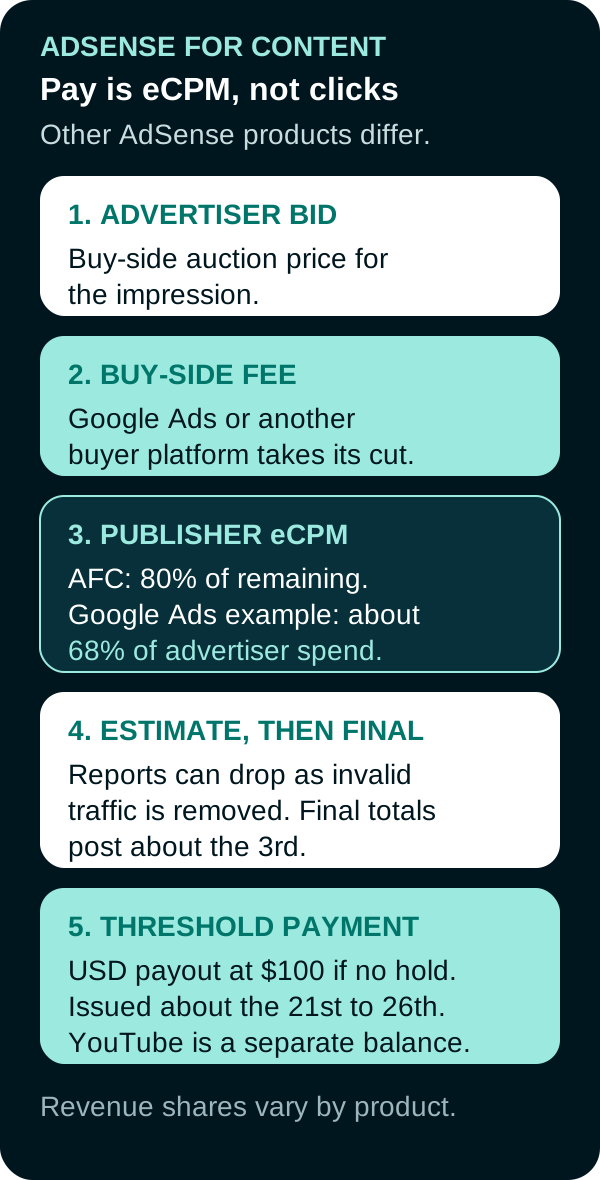
AdSense for Content path from advertiser demand through publisher eCPM, finalization, and payment.
Publisher readiness
Eligibility is a review, not a traffic trophy. Before you apply:
| Check | Why it matters |
|---|---|
| You are 18 or older, or a parent or guardian applies | Google will not accept an under-18 applicant on their own account |
| You can edit the site HTML | Hosted products (such as Blogger) and YouTube use their own signup paths |
| Content is original and attracts an audience | Policy and quality review can cover more than the URL you submit |
| The site follows AdSense Program policies and Google Publisher Policies | Violations can disable serving or the account |
| One AdSense account | Duplicate accounts are a policy issue |
| Ads are not the page’s purpose | Pages published only to show ads are not allowed |
YouTube ad-revenue sharing is a different gate. As of September 2026, the YouTube Partner Program requires 1,000 subscribers plus 4,000 qualified watch hours in 12 months, or 1,000 subscribers plus 10 million qualified Shorts views in 90 days, then a review and an AdSense for YouTube payments account. YouTube has announced higher watch-hour and Shorts-view entry thresholds for new creators beginning February 1, 2027. Meeting the applicable numbers does not auto-approve the channel.
How site ads serve
After approval you place AdSense code, turn on Auto ads, and/or create manual units. Auto ads can show in-page banners, Multiplex native grids, related search, and overlay formats. Manual units still exist for display, in-article, and in-feed placements. AdSense for Search is a separate product; Google’s revenue-share page says it does not disclose the share for every AdSense product and that other products vary.
Google selects which ads eligible advertisers may show. Publishers can block advertiser URLs, general categories, and sensitive categories. Google does not guarantee that every related ad is caught. Publishers cannot click their own ads, pay people to click, or dress ads up as navigation.
Revenue equation (AdSense for Content)
Separate three layers:
- Advertiser auction (buy-side). Advertisers bid for the impression. Click or conversion pricing on that side is their cost, not your line item.
- Publisher eCPM. For AdSense for Content, publishers receive 80% of the remaining revenue after the advertiser platform takes its fee. When advertisers buy through Google Ads, Google says publishers keep about 68% of that advertiser spend. Google pays an eCPM, not a clicks-only split of the bid. Other AdSense products differ. Shares are not averaged across publishers. A platform partner can take an extra share after Google’s.
- Adjustments. Invalid activity, policy issues, rounding, and rare advertiser payment defaults can reduce what you keep.
Hypothetical illustration of Google’s Google Ads example, not a forecast: if an advertiser’s display spend against your page were $10.00 CPM through Google Ads, about 68% would be $6.80 publisher eCPM before later invalid-traffic or default adjustments. Your site will not earn that number just because the example is round.
Estimated earnings, finalization, and pay
Reports are estimates. Google notes that estimated clicks and earnings can fall, especially within about 48 hours, as invalid activity is processed (clicks and earnings removed). Finalized earnings are the validated amount minus later deductions, including advertisers who do not pay Google. Deductions are not appealable. Google may not name the exact days or URLs involved.
The payment cycle is monthly. June estimates finalize around July 3. If the threshold is met (USD $100 per payments account; other currencies differ) and there is no hold, Google issues payment about the 21st to the 26th. Site AdSense and YouTube can be separate balances that each must clear the threshold. You are paid from the Payments page, not from Analytics estimates.
Compare added ad revenue with whether the page still completes its job. An extra unit that interrupts reading or slows the page is not automatically worth keeping.
Practical check
Confirm eligibility and YouTube versus site scope before applying. Read estimated earnings as provisional. Treat finalized Payments-page totals as the payable figure. Do not model publisher income as “clicks times advertiser CPC.”
FAQs
Do I pick every ad that appears on my site?
No. AdSense selects ads from eligible advertisers. Publishers can block general categories, sensitive categories, and advertiser URLs, with no guarantee that every related ad is caught. That is not the same as choosing each creative. Clicking your own ads is prohibited.
How does AdSense pay publishers?
For AdSense for Content, Google pays an effective cost per mille (eCPM) after the advertiser platform takes its fee. Publishers receive 80% of the remaining amount. When advertisers buy through Google Ads, Google says publishers keep about 68% of that advertiser spend. Other AdSense products use different shares.
When do estimated AdSense earnings become a payment?
Estimated figures can change as invalid activity is removed. Earnings for a month are finalized around the 3rd of the next month. If the balance meets the payment threshold, such as $100 for USD accounts, and there is no hold, Google issues payment about the 21st to the 26th. YouTube and site AdSense can be separate balances.
Is YouTube monetization the same as website AdSense?
No. Website AdSense requires you to be 18 or older, control the site HTML, and meet program policies. YouTube ad revenue sharing requires the YouTube Partner Program, including subscriber and watch-hour or Shorts-view thresholds, then a linked AdSense for YouTube payments account.
PUT THIS KNOWLEDGE TO WORK
NEED MORE HELP?
Talk with our team about applying Google AdSense to your marketing.
Get a free marketing audit call