

Backlink Analysis: How to Audit Links Step by Step
Backlink analysis reviews links from other websites to your site, including the source page, destination, anchor text, placement, attributes, status, and relevance.
What is backlink analysis?
Backlink analysis is a structured review of links from other websites to your site. It identifies where each link appears, which page it reaches, how it is described, whether it still works, and what action the evidence supports.
A useful audit ends with a decision list. It separates links to protect, links to reclaim, destination pages to improve, credible outreach opportunities, and patterns that need manual review.
Backlink tools use different indexes, so their totals will not match. Treat every export as one view of the link profile rather than a complete list of links across the web.
What should a backlink analysis deliver?
A backlink audit should answer five practical questions:
- Which pages and resources earn relevant editorial links?
- Which valuable links are broken, redirected, or no longer present?
- Does the anchor text and placement look natural in context?
- Which competing resources earn links that your page does not?
- What should the team protect, reclaim, improve, investigate, or pursue next?
The output is more useful than a single authority score. A score can help sort a large export, but it cannot replace reading the referring page and checking the destination.
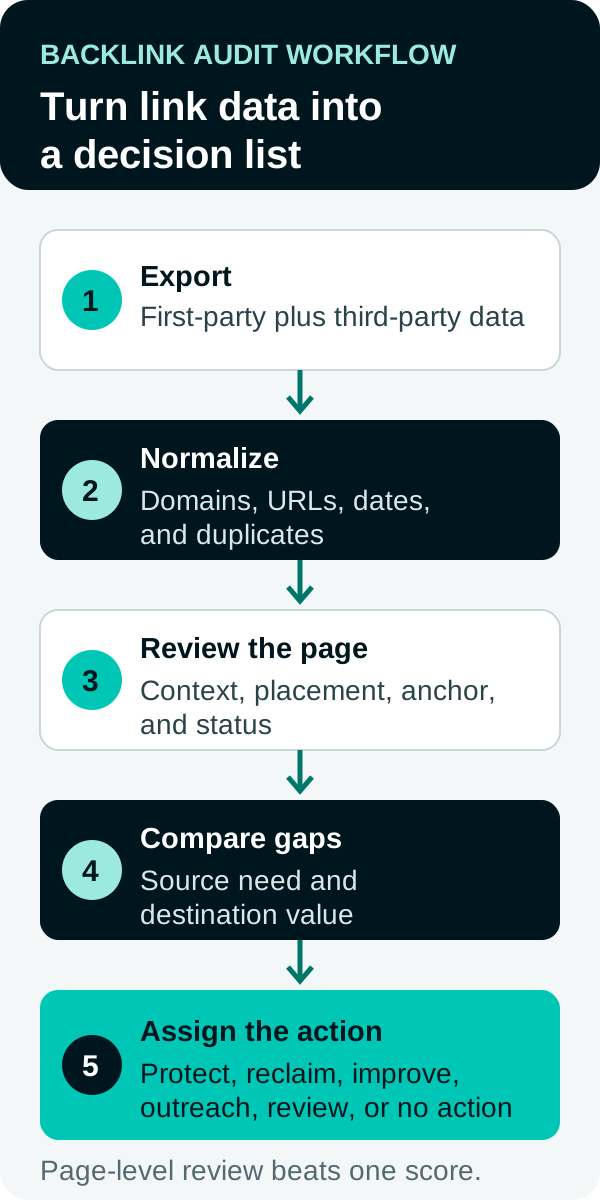
How do you run a backlink analysis?
- Export link data. Start with Google Search Console for the verified property. Add a third-party index when you need competitor data, historical discovery, or wider coverage.
- Normalize and deduplicate the exports. Standardize domains and URLs, remove duplicate source-to-target pairs, and retain source-specific first-seen and last-seen dates.
- Group links by referring domain and target page. Find destination pages that attract links and domains that link more than once.
- Review page-level quality. Read the source page and inspect relevance, editorial context, placement, link attributes, anchor text, accessibility, and destination fit.
- Check link status. Confirm whether the link is live, removed, redirected, broken, or still unverified. Follow redirects to the final canonical destination.
- Review anchor patterns. Separate brand names, URLs, topical phrases, and commercial phrases. Investigate unusual repetition instead of assuming it is harmful.
- Compare relevant competing pages. Find credible sources that link to competing resources but not to yours, then identify what those resources provide.
- Assign a next action. Route each finding to protection, reclamation, destination improvement, outreach, manual review, or no action.
Pair the findings with a documented link-building strategy so the audit leads to specific work.
Backlink audit worksheet
Use one row for each source-page and target-page pair. Keep the original export fields so another reviewer can trace every decision.
| Field | What to record | Why it matters |
|---|---|---|
| Referring page | Full source URL | Lets a reviewer inspect the actual context |
| Referring domain | Normalized root domain | Supports grouping and deduplication |
| Target page | Final canonical destination | Finds broken URLs, redirect chains, and concentrated links |
| Anchor text | Visible linked words or linked-image alt text | Shows context and unusual commercial patterns |
| Placement | Main copy, resource list, author bio, directory, footer, or sitewide template | Separates editorial references from repeated templates |
| Link attribute | Standard, nofollow, sponsored, or ugc when observable | Prevents treating every link as equivalent |
| First and last seen | Dates supplied by the source | Helps investigate new or possibly lost links without claiming certainty |
| Relevance note | Relationship between the source topic and destination | Forces page-level review instead of score-only triage |
| Status | Live, redirected, broken, removed, or unverified | Routes reclamation work |
| Next action | Protect, reclaim, improve, outreach, review, or no action | Converts analysis into accountable work |
Worked hypothetical example
Assume an industry association’s resource page links to an old research report on your site. The link sits in the main article, uses the report title as anchor text, and now passes through two redirects before reaching a general service page.
| Field | Example finding |
|---|---|
| Referring page | Industry association resource guide |
| Target page | Retired research-report URL |
| Placement and anchor | Editorial resource list using the report title |
| Status | Live link with a two-hop redirect to a weak substitute |
| Relevance | Strong topic match and clear editorial reason for the citation |
| Next action | Restore an equivalent report or redirect directly to the closest useful replacement, then ask the publisher to update the URL |
The example does not need a proprietary score to support a decision. The referring context is relevant, the original citation had a clear purpose, and the current destination no longer satisfies that purpose.
What signals show backlink quality?
Backlink quality depends on the relationship between the source page, the link, and the destination. Review observable evidence before using a vendor metric as a filter.
| Signal | Questions to ask |
|---|---|
| Topical relevance | Does the source page cover a subject related to the destination? |
| Editorial context | Does the link support the surrounding sentence or resource list? |
| Placement | Is the link in useful main content, an author bio, a directory, a footer, or a sitewide template? |
| Referring page | Does the page load and contain substantive publisher-controlled content? |
| Anchor text | Does the wording describe the destination without a repeated pattern of commercial keywords? |
| Link attribute | Is the link standard, nofollow, sponsored, or ugc? |
| Link status | Is it live, redirected, broken, removed, or still unverified? |
| Destination | Does the final page load, match the reference, and avoid an unnecessary redirect chain? |
Use the evidence to route work:
- Protect or reclaim first: a relevant editorial link points to a useful destination that is broken or unnecessarily redirected.
- Improve the destination: credible sources link to stronger competing resources because your page lacks the cited material.
- Review manually: the pattern includes commercial anchor concentration, unclear ownership, suspicious placement, or a possible policy issue.
- Take no action: the link has little value but creates no manual-action concern.
Which tools can you use for backlink analysis?
Choose tools based on the question, not one headline total. Product access, limits, and interfaces can change, so confirm them in current official documentation before starting an audit.
| Tool | What it contributes | Best use | Access and limits to verify |
|---|---|---|---|
| Google Search Console | A first-party sample of top linking sites, top linked pages, and linking text for a verified property | Reviewing your own site | Individual report tables show up to 1,000 rows; the landing-page external-link export can provide up to 100,000 rows. Links may be historical, and the report does not show nofollow status |
| Ahrefs | A separate backlink index with link history and competitor comparisons | Broader discovery and competitor gaps | Confirm plan access, export limits, index scope, and proprietary metric definitions |
| Semrush | Backlink research alongside keyword, competitor, and site-audit tools | A combined SEO research workflow | Confirm project, export, competitor, and historical-data limits |
| Moz Link Explorer | Inbound-link, anchor-text, and proprietary authority reporting | Link prospecting and campaign review | Confirm query, export, tracking, and index limits |
Search Console’s Links report is not a complete backlink index. Individual report tables are limited to 1,000 rows, while the landing-page external-link export can provide up to 100,000 rows. The report is also separate from the Search Analytics API used for search clicks and impressions. Export link rows from the Links report when you need to review the verified property’s backlink sample.
Teams can combine exports when a decision requires more coverage, then track the work in an analytics dashboard.
How do you run a backlink gap analysis?
A backlink gap identifies credible pages that link to competing resources but not to yours. The goal is to learn why those sources linked, then decide whether your destination or outreach deserves improvement.
- Choose two to four pages that compete for the same topic. Avoid comparing whole domains with different audiences.
- Export referring pages and domains from a third-party index. Search Console only reports the verified property.
- Find relevant sources that link to more than one competing resource but not to your page.
- Read each source page and record what its current citations provide.
- Compare that editorial need with your page. Identify a missing dataset, example, tool, template, definition, or point of view.
- Improve the destination when needed, then write an outreach note tied to the exact source page and reader need.
- Track discovered prospects, outreach, responses, and earned links as separate stages.
Our competitive analysis capability covers the wider research process. Align new assets with search demand through keyword planning and support them with content marketing. Teams that would rather hand the program to a partner can compare the best SEO and AEO agencies in Miami.
How should you prioritize backlink opportunities?
Start with assets and relationships that already show a credible editorial reason to link.
- Reclaim relevant links that now point to a broken page or poor replacement.
- Protect pages that already earn useful citations and keep their referenced material current.
- Improve destinations when competitors earn links through a resource your page lacks.
- Pursue backlink gaps where the source, audience, and editorial need clearly match.
- Review suspicious patterns only when the evidence supports investigation.
Original research, useful templates, calculators, and complete reference guides give publishers a concrete reason to cite a page. A generic outreach list does not fix a destination that offers nothing distinct.
When should you use Google’s disavow tool?
Use Google’s disavow tool only when many spammy, artificial, or low-quality links caused, or are likely to cause, a manual action. Most sites should not use disavowal as routine cleanup or submit every suspicious-looking domain.
Google states that both conditions should apply:
- A considerable number of spammy, artificial, or low-quality links point to the site.
- Those links caused a manual action or are likely to cause one.
Review Google’s official disavow guidance before submitting a file. If a manual action involves unnatural links, document attempts to remove links and avoid disavowing organic links.

What can backlink data prove?
Backlink data can show relationships, link patterns, status changes recorded by a provider, and opportunities for closer review. It cannot prove that a link caused a ranking change, that one index found every link, or that a vendor score represents Google’s evaluation.
For wider context, a 2023 Ahrefs study reported that 96.55% of roughly 14 billion pages in its Content Explorer index had zero estimated organic traffic from Google. This is a third-party traffic estimate, not evidence that any one backlink caused or prevented traffic.
Source: Ahrefs indexed-page traffic analysis, 2023.
How Anderson Collaborative uses backlink analysis
Backlink analysis is strongest when it explains why a page earned attention. We group links by destination, context, and likely editorial motive, then use that pattern to improve link-worthy assets rather than chase isolated domain scores.
Frequently Asked Questions
What is backlink analysis?
Backlink analysis is the process of reviewing links from other websites to your site. The review shows which pages attract links, where links come from, how anchor text is used, and which opportunities or risks need investigation.
How do you analyze backlinks?
Export link data, combine and deduplicate the sources, then review referring pages, linked pages, relevance, placement, link attributes, and anchor text. Compare relevant competitors and turn the findings into a prioritized action list.
Which tools can you use for backlink analysis?
Google Search Console provides a sample of links to a verified property. Ahrefs, Semrush, and Moz maintain separate third-party indexes with competitor research and proprietary metrics. Use more than one source when coverage matters.
Should you disavow spammy backlinks?
Google says to disavow only when a considerable number of spammy, artificial, or low-quality links caused or are likely to cause a manual action. Most sites should not treat disavowal as routine cleanup.
Video by Ahrefs, published April 16, 2018.
Sources
- Google Search Central, link best practices
- Google Search Central, spam policies for Google web search
- Google Search Console Help, Links report
- Google Search Console Help, disavow links guidance
- Ahrefs Starter plan and limits
- Semrush SEO and AI Search pricing
- Moz Pro pricing
- Ahrefs indexed-page traffic analysis, 2023
PUT THIS KNOWLEDGE TO WORK
NEED MORE HELP?
Talk with our team about applying Backlink Analysis to your marketing.
Get a free marketing audit call