

Core Web Vitals: Diagnose LCP, INP, and CLS
Core Web Vitals are Google's field metrics for loading (LCP), interaction responsiveness (INP), and visual stability (CLS). A page passes when all three meet the good threshold at the 75th percentile of real visits, measured separately for mobile and desktop.

Core Web Vitals are Google’s field metrics for loading, interaction responsiveness, and visual stability. The current set is Largest Contentful Paint (LCP), Interaction to Next Paint (INP), and Cumulative Layout Shift (CLS). web.dev’s Web Vitals article (updated October 31, 2024) and Google Search’s Core Web Vitals page use the same good thresholds: LCP within 2.5 seconds, INP at 200 milliseconds or less, and CLS at 0.1 or less.
Passing those thresholds is a user-experience target, not a ranking promise. Google’s page-experience guidance says ranking systems use Core Web Vitals, and that good Search Console or third-party scores do not guarantee a top result. Relevance still wins when pages compete. Web design and development work should still chase the field metrics because visitors feel them.
Thresholds, field data, and lab data
Google classifies a page as passing Core Web Vitals when all three metrics meet the good target at the 75th percentile of real page loads, split by mobile and desktop. The 75th percentile is the value that 75 percent of visits meet or beat. It is not an average.
| Metric | What it measures | Good | Needs improvement | Poor |
|---|---|---|---|---|
| LCP | Time until the largest visible image or text block renders | 2.5 s or less | Up to 4 s | Over 4 s |
| INP | Time from click, tap, or key press until the next paint | 200 ms or less | Up to 500 ms | Over 500 ms |
| CLS | Unexpected layout movement during the page’s life | 0.1 or less | Up to 0.25 | Over 0.25 |
Search Console’s Core Web Vitals report uses Chrome User Experience Report (CrUX) field data over a rolling 28-day window. URLs are grouped by similar templates. Once a group has enough LCP and CLS data, the group’s status is its worst metric. Mobile and desktop are separate tabs. Low-traffic URLs can show no row.
Field versus lab. Field data is what real Chrome users experienced. Lab data is a simulated load (Lighthouse, a local DevTools trace, WebPageTest). Lab tools are the right place to reproduce a cause before release. They are not a substitute for CrUX. A standard load-only Lighthouse run does not observe the real interactions needed for field INP, so it reports Total Blocking Time as a diagnostic proxy.
INP replaced FID in March 2024. FID is historical.
Symptom-to-cause table
| Symptom in field data | Likely lab trace | Common root cause | First repair to try |
|---|---|---|---|
| LCP is slow, TTFB is also slow | Document request waits | Server, redirects, cache miss, distant origin | Reduce TTFB: fewer redirects, cache HTML, closer origin |
| LCP is slow, TTFB is fine, FCP is late | Render-blocking CSS or JS | Stylesheets or scripts delay first paint | Inline critical CSS, defer non-critical JS |
| LCP is a large image that starts late | Resource load delay | Hero image not in HTML, lazy-loaded, or low priority | Discover the image from HTML; do not lazy-load the LCP image |
| LCP image loads, then still waits | Element render delay | Client-side render, main-thread work, or waiting on other work | Render the LCP element as soon as its resource is ready |
| INP is poor on a template with menus, filters, or carts | Long tasks around the interaction | Input delay, heavy handlers, or presentation delay | Break long tasks; show immediate visual feedback |
| CLS is poor on article or PDP templates | Shifts after load | Unsized images, ads, embeds, webfonts, injected banners | Reserve space; avoid inserting content above existing content |
web.dev’s LCP optimization guide splits LCP into four subparts that add up to the whole metric: Time to First Byte, resource load delay, resource load duration, and element render delay. Delay subparts should stay small. INP observes click, tap, and keyboard interactions, not hover or plain scrolling. CLS counts unexpected shifts. Shifts within 500 milliseconds of discrete input are generally excluded.
Third-party tags, chat widgets, and ads show up in all three metrics. Treat them as first-class suspects when a template fails in the field but looks fast on a quiet local profile.
Diagnosis workflow
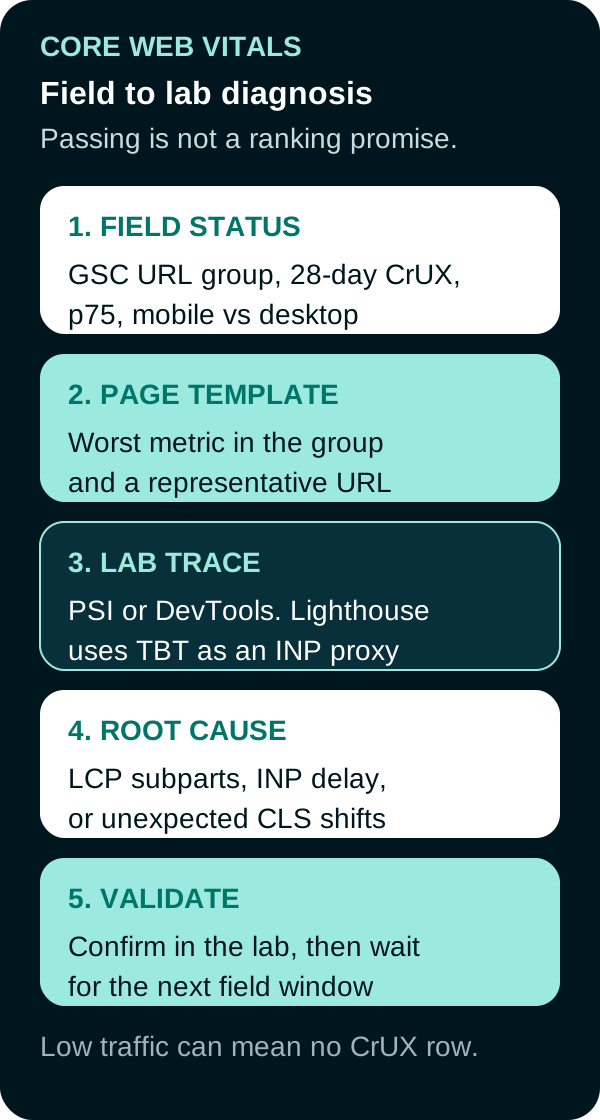
- Read field status. In Search Console, note device, URL group, which metric is Poor or Needs improvement, and the 75th-percentile value. If there is no data, the URL group may be below CrUX volume. Use origin-level CrUX or your own RUM instead of guessing.
- Pick a page template. Open a representative URL from the group, not a one-off campaign landing page unless that URL is the group.
- Compare field and lab. PageSpeed Insights shows CrUX (if available) and a Lighthouse lab run. If field LCP is poor and lab LCP is good, reproduce a slower device or network. If both are poor, the lab trace is enough to start.
- Trace the cause. In Chrome DevTools Performance, identify the LCP element and its subparts, the INP interaction (or TBT long tasks in Lighthouse), or the layout-shift sources.
- Fix one cause, then validate. Confirm the lab trace improved. Ship. Field reports lag because Search Console uses 28 days of CrUX, so a single Lighthouse score is a lab checkpoint rather than production proof.
This measurement work sits next to how the page appears on a SERP. Speed is not an E-E-A-T factor.
Frequently Asked Questions
What are the three Core Web Vitals?
Largest Contentful Paint (LCP) for loading, Interaction to Next Paint (INP) for responsiveness, and Cumulative Layout Shift (CLS) for visual stability. Google treats all three as stable Core Web Vitals.
Did INP replace FID?
Yes. INP replaced First Input Delay as the responsiveness Core Web Vital in March 2024 because FID only measured delay on the first input. INP looks at click, tap, and key interactions across the visit.
What counts as a good Core Web Vitals score?
At the 75th percentile of real visits, good means LCP at 2.5 seconds or less, INP at 200 milliseconds or less, and CLS at 0.1 or less. Search Console also uses Needs improvement and Poor bands above those values.
Are Core Web Vitals a Google ranking factor?
Google says Core Web Vitals are used by ranking systems as part of page experience. Good report scores do not guarantee top rankings. Relevance and content quality still decide which page Search shows.
How should a team check Core Web Vitals?
Start with Search Console’s field report for URL groups, then open a representative URL in PageSpeed Insights. Use a lab trace to find the cause. A standard load-only Lighthouse run cannot measure field INP, so Total Blocking Time is a diagnostic proxy.
Sources
- web.dev, Web Vitals, updated October 31, 2024, accessed September 20, 2026.
- web.dev, Optimize Largest Contentful Paint, updated March 31, 2025, accessed September 20, 2026.
- web.dev, Interaction to Next Paint, updated September 2, 2025, accessed September 20, 2026.
- web.dev, Cumulative Layout Shift, accessed September 20, 2026.
- Google Search Central, Understanding Core Web Vitals and Google search results, accessed September 20, 2026.
- Google Search Central, Understanding page experience in Google Search results, accessed September 20, 2026.
- Search Console Help, Core Web Vitals report, accessed September 20, 2026.
- PageSpeed Insights, About, accessed September 20, 2026.
- Google Search Central blog, Introducing INP to Core Web Vitals, May 10, 2023.
PUT THIS KNOWLEDGE TO WORK
NEED MORE HELP?
Talk with our team about applying Core Web Vitals to your marketing.
Get a free marketing audit call